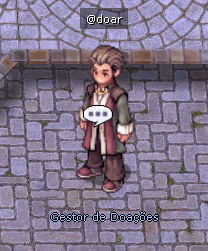
Donation ManagerDonation Manager in ReClassic
The Donation Manager is the NPC responsible for handling donations through Pix or MercadoPago on ReClassic, letting players donate and receive Cash Points instantly. Below are the features and details of the donation process.
Location
Map: prontera
Coordinates: 89, 51
Features
The Donation Manager NPC offers two main payment options, letting players choose the most convenient method to donate to the server.
Payment Type
Method
Description
Pix Donation
QR Code
Donations made via Pix directly, with a transaction code generated.
MercadoPago Donation
MercadoPago Gateway
Donations made through MercadoPago, using a generated link for the transaction.
Donation Bonus
Players who donate more than R$100.00 receive an extra 10% bonus in Cash Points. This is an incentive for players to contribute larger amounts and get extra rewards in the game.
Donation Process
Below is the full process to make your donation and secure your Cash Points.
1. Choose the payment type:
Pick Pix or MercadoPago to make your donation.
2. Enter the donation amount:
The player must enter the donation amount. The minimum amount is R$1.00.
3. Confirm the transaction:
Confirm the transaction details, including the generated code and the donation amount.
4. Complete the payment:
The player receives a link to complete the payment, and the transaction status updates automatically.
Terms and Conditions
Each R$1.00 donated equals 1,000 Cash Points.
All donations are subject to verification. Fraudulent payments will result in punishment without prior warning.
The minimum time between donations is 10 seconds.
The minimum donation allowed is R$1.00.
Transaction Information
After the donation, the following information is stored in the database:
Information
Description
Account ID
The account ID of the player who made the donation.
Transaction Code
A unique code generated for each donation.
Amount
The amount in reais of the donation made.
Payment Type
The payment method used (Pix or MercadoPago).
Payment Status
The current status of the transaction, for example, "Awaiting Payment".
Command
This NPC also lets players use the @doar command to open the donation interface from anywhere in the game. The command opens the donation menu directly, making it easier to contribute without needing to go to the NPC.