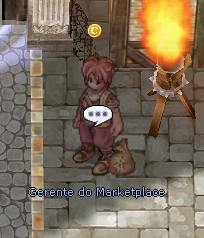
Marketplace Manager NPC in Prontera
The Marketplace Cash is a system integrated between the game and the website that allows buying and selling items between players using Cash Points. The seller lists the item through an NPC in the game, sets the price in Cash, and any player can reserve and buy it on the website.
Marketplace Manager NPC
The Marketplace Manager NPC is located in Prontera (73, 70) and offers the following options:
Option
Description
Sell Item
Lists an item from your inventory on the marketplace with a price in Cash Points. The item is removed from your inventory when listed.
My Listed Items
View your active listings, with the option to cancel individually or withdraw all at once. Canceled items are returned to your inventory.
My Reservations
Shows the items you reserved on the website. Here you pay with Cash Points and collect the item.
View History
Shows your last 10 transactions (purchases and sales).
How to Sell an Item
Talk to the Marketplace Manager NPC and select Sell Item.
Choose the category: Equipment, Etc or Usable.
Select the desired item from your inventory.
If you have more than 1 unit, set the quantity (maximum 30 per listing).
Enter the price in Cash Points (minimum 1,000, maximum 1,000,000 per unit).
Confirm: the item is removed from your inventory and appears immediately on the website.
When someone buys it, the Cash is credited directly to your account.
Warning: Equipped, bound, or trade-restricted (NoTrade) items cannot be listed. Duplicate equipment in your inventory should be kept in storage: only keep what you want to sell.
Selling in Bulk
When listing more than 1 unit of an item, the price entered is per unit. Buyers can purchase any available quantity from the stock.
Example: if you list 10 Muscovite for 2,000 Cash, each unit costs 2,000 Cash. A buyer can reserve 3 units (total: 6,000 Cash) and the rest stays available.
How to Buy an Item
Buying is done in two steps: reserving on the website and paying in the game.
Go to the Marketplace on the ReClassic website.
Browse the available items: filter by category or search by name.
Click Reserve and choose the desired quantity.
Log into the game and talk to the Marketplace Manager NPC.
Select My Reservations: your reserved items will appear in the list.
Confirm payment in Cash Points and the item will be delivered to your inventory.
Important: Reserving doesn't guarantee the item. Multiple players can reserve the same item: whoever pays at the NPC first gets it. If another player pays before you, your reservation is automatically removed and no Cash is charged.
How to Get Cash Points
To use the Marketplace, you need Cash Points on your account. There are three ways to get them:
@doar command (in-game): converts zeny into Cash Points according to the server's rates.
Donation Manager NPC: located in Prontera, offers Cash packages in exchange for zeny or real donations.
PIX deposit on the website: go to the Deposit Cash page on the ReClassic website and complete the payment via PIX. The balance is credited automatically.
The Cash balance is shared between the Marketplace and the game's Cash Shop.
Items on the Marketplace
The website displays items with all the relevant information:
Sprite and item name
Refine level (e.g. +9 Sword)
Cards inserted in slots (with names)
Active Random Options
Seller (character name)
Price in Cash Points
Quantity available in stock
Filters available on the website: All Items, Consumables, Equipment, Cards.
Reservation System
The Marketplace Cash uses a multiple reservation system. This means that:
Any player can reserve an item on the website, even if others have already reserved it.
The item stays visible and available for reservation as long as it hasn't been paid for.
When you talk to the NPC and confirm the payment, the first to pay gets the item.
The other players who had a reservation are notified that the item was sold.
No Cash is charged from those who couldn't complete the purchase.
This keeps a player from "blocking" an item without paying, keeping the marketplace fair for everyone.
Rules
Rule
Detail
Minimum price
1,000 Cash per unit
Maximum price
1,000,000 Cash per unit
Maximum quantity per listing
30 units (for stackable items)
Listing validity
7 days. If the item isn't sold in that time, it's automatically returned to the seller and the listing is removed from the marketplace
Canceling a listing
Allowed at any time (while unsold): the item is returned to your inventory and reservations are canceled
Sale notification
The seller receives in-game mail when their item is sold
Self-purchase
You are not allowed to buy your own items
Important Information
Cash received from a sale is credited instantly to the seller's account, even if they're offline.
Purchased items are delivered directly to your inventory when you confirm the payment at the NPC.
Listings are valid for 7 days. If the item isn't sold in that time, it's automatically returned to your inventory (applied on your next login).
Reservations automatically expire after 24 hours if not completed at the NPC. You can also cancel at any time from the My Reservations option.
If you run into any issues, open a ticket on the official ReClassic Discord.